Sunday, January 15, 2017

Canon Image Runner Printer Configuration Steps


1.Go to  the following link http://support-in.canon-asia.com/?personal

2.In that page select the Product Category of your printer

Example now the printer is iR 2530 is coming under
Business Multifunction Category
Prdouct Series     =    < Image Runner Series >
Model            =    < iR2530 >
Document Type    =    < Drivers and Software Downloads >

Then click “Find” Options this will leads to the list of available drivers

3.Click the Downloads → Linux 32bit (1) options this will list driver for iR 2530 and Click that link 
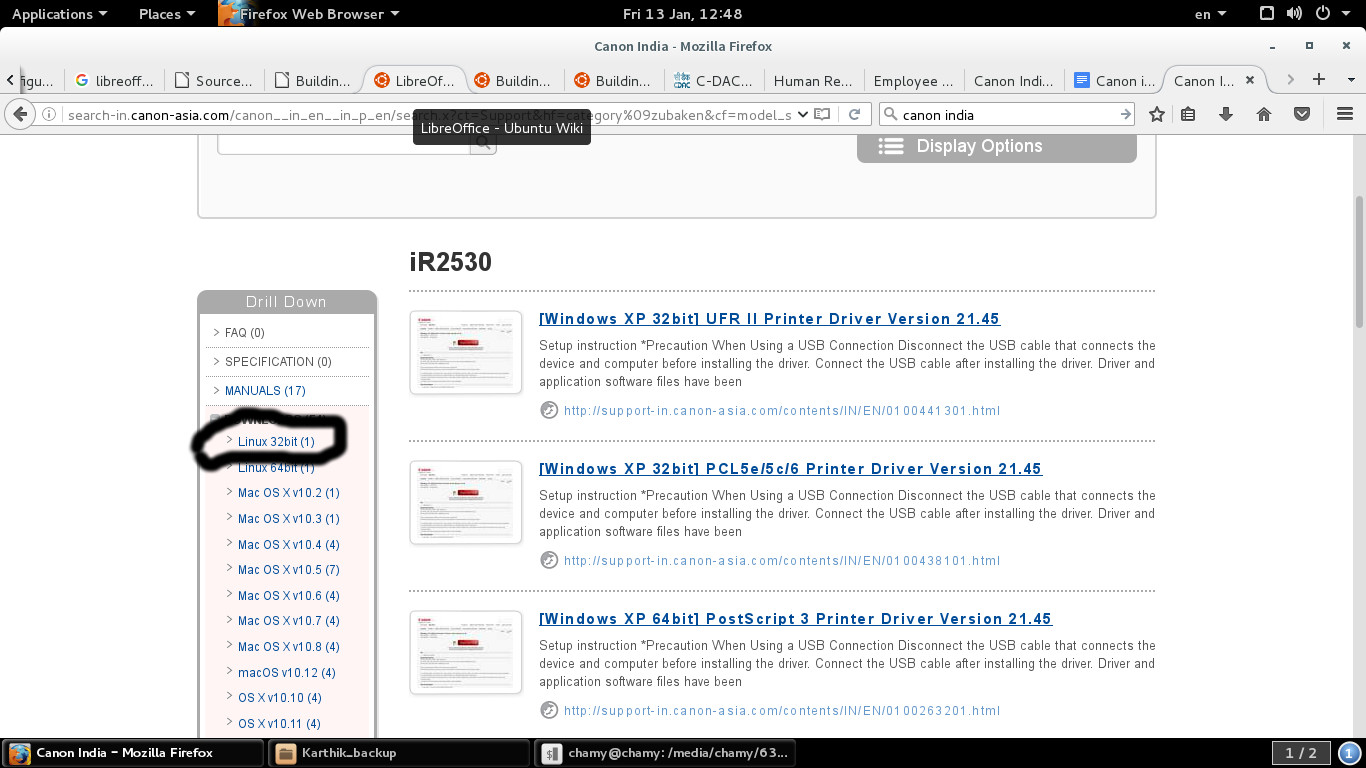
iR2530.jpg


4.From the page you have to click the “Download ” Link and Save it in to the local folder file name is like this UFR II/UFR II LT Printer Driver for Linux V3.30.tar.gz

5.Extract the tar file

6.Open the Terminal and Change the directory to the Extracted driver folder

7.In that folder you find install.sh file then issue following commands

Before issuing commands system connected with Internet or Connected Local Repository because it is have dependency packages.

chmod u+x install.sh

sudo bash install.sh

8.Now the packages have been installed successfully and proceed with usual printer configuration method.

Tuesday, April 26, 2016

Install Debian Packages in BOSS GNU /Linux

1.first check the repository by issuing following command.

sudo apt-get  update

2.if the repository is failed connect with repository server or change the differvent bosslinux distribution version repostory by editing following file

gedit /etc/apt/sources.list

3.after changing sources.list file repeat step 1.

4.to search the desired package in repository issue following command

apt-cache search "word to search the desired package"

example:

apt-cache search flashplugin

Output:
flashplugin-nonfree - Adobe Flash Player - browser plugin
flashplugin-nonfree-extrasound - Adobe Flash Player platform support library for Esound and OSS
pepperflashplugin-nonfree - Pepper Flash Player - browser plugin


5. To install the package named "flashplugin-nonfree" issue following command

sudo apt-get install flashplugin-nonfree

Thursday, December 17, 2015

Thursday, December 10, 2015

Lenovo thinkcentre mini pc issue :system is restarted when shtdown or power of in BOSS Linux

kindly go to the BIOS and disable the automatic power on option this will prevent the system rebooting when shutdown or power off.

F2 -> power -> Automatic Power On -> Wake on LAN -> Automatic

this should be changed to

F2 -> power -> Automatic Power On -> Wake on LAN ->Disabled

Wednesday, November 18, 2015

Edit a file directly using "sed" command in Linux


sed is stream editor, but can edit files directly

sed -i -e 's/foo/bar/g' hello.txt
 
s is used to replace the found expression "foo" with "bar" and g used to

replace any found matches.

-i option is used to edit in place on hello.txt.

-e option indicates a command to run.


Tuesday, October 27, 2015

Booting the BOSS Linux as in command prompt mode


1.Open the /etc/default/grub file and uncomment the following line

GRUB_TERMINAL=console

2.Set the resolution to 1024x768

GRUB_GFXMODE=1024x768

3.issue the following commands after above modification

sudo update-initramfs -u -k 2.6.32.59
sudo update-grub

4.This was done in BOSS Linux due to not able to boot the windows 7 in the dual mode.


or click and download following script and run it as a sudo user

flicker_removng_console_mode_boot_script

Tuesday, June 16, 2015

Dell Server BCM5709S Ethernet card is not Working in BOSS [SOLVED]

1.issue following commands

apt-get update

apt-get install firmware-bnx2

2.Otherwise download the firmware bnx2/bnx2-mips-09-6.2.1b.fw and copy in to /lib/firmware.

How to interact with the non-interactable Web Elements in Selenium

How to interact with the non-interact able Web Elements in Selenium    // Find the non-interactable element element WebElement element = dr...