Showing posts with label bosslinux. Show all posts

Sunday, November 20, 2022

JAVA Path and JAVA_HOME Path Setting in Linux


  1. Open the Terminal

  2. Prepend sudo if logged in as not-privileged user, ie. sudo nano

  3. nano /etc/profile

  4. Press 'i' to get in insert mode
  5. add following :

    export JAVA_HOME="path that you found"
    
    export PATH=$JAVA_HOME/bin:$PATH
    
  6. logout and login again, reboot, or use source /etc/profile to apply changes immediately in your current shell

Friday, September 23, 2022

Getting Wazuh Agent key from Wazuh Server

 TOKEN=$(curl -u "<username>:<password>" -k -X GET "https://<hostname or ip address>:<port number>/security/user/authenticate?raw=true")


curl -k -X POST -d '{"name":"<agentname>"}' "https://<hostname or ip address>:<port number>/agents?pretty=true" -H "Content-Type:application/json" -H "Authorization: Bearer $TOKEN"

Thursday, December 12, 2019

How to run the simple http server


1.open the terminal in linux
2.go to the current folder you want share and issue following on terminal

python -m SimpleHTTPServer

Sunday, January 15, 2017

Canon Image Runner Printer Configuration Steps


1.Go to  the following link http://support-in.canon-asia.com/?personal

2.In that page select the Product Category of your printer

Example now the printer is iR 2530 is coming under
Business Multifunction Category
Prdouct Series     =    < Image Runner Series >
Model            =    < iR2530 >
Document Type    =    < Drivers and Software Downloads >

Then click “Find” Options this will leads to the list of available drivers

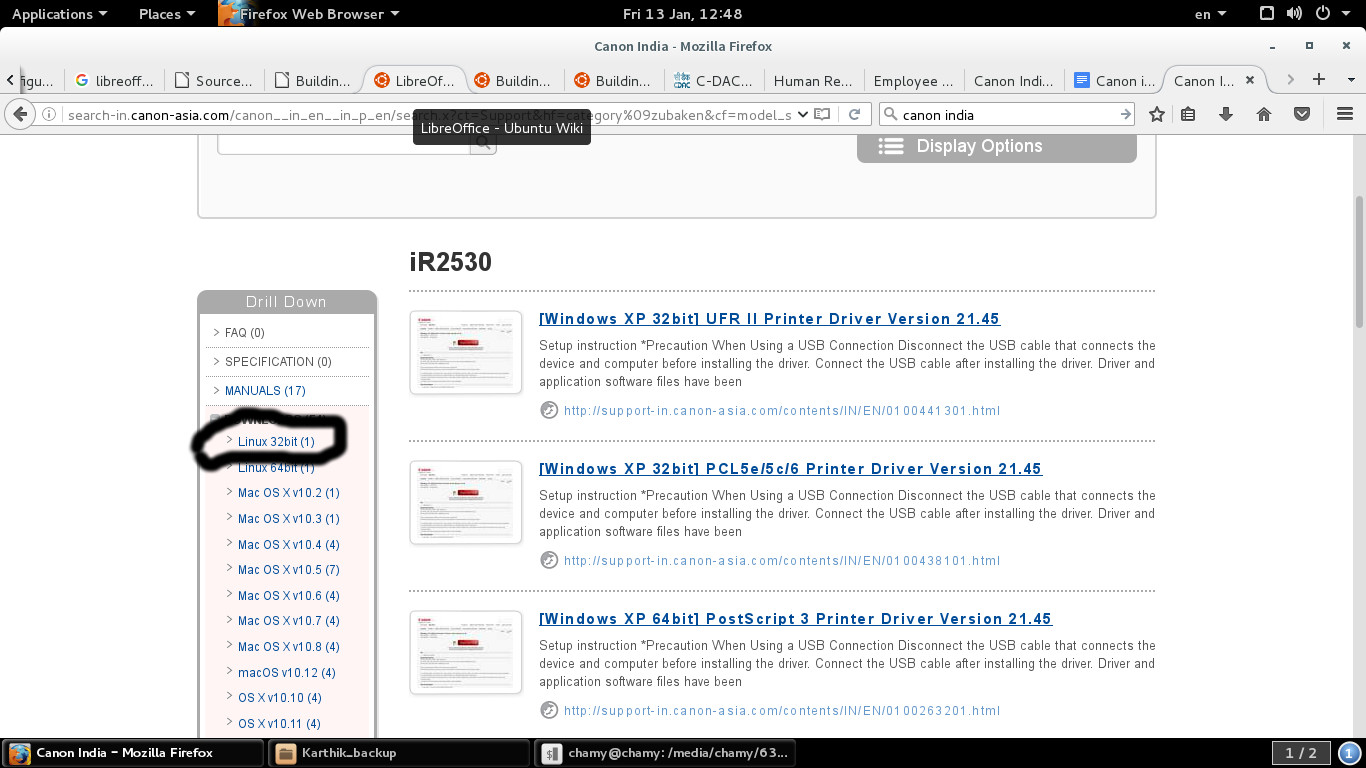
3.Click the Downloads → Linux 32bit (1) options this will list driver for iR 2530 and Click that link 

iR2530.jpg


4.From the page you have to click the “Download ” Link and Save it in to the local folder file name is like this UFR II/UFR II LT Printer Driver for Linux V3.30.tar.gz

5.Extract the tar file

6.Open the Terminal and Change the directory to the Extracted driver folder

7.In that folder you find install.sh file then issue following commands

Before issuing commands system connected with Internet or Connected Local Repository because it is have dependency packages.

chmod u+x install.sh

sudo bash install.sh

8.Now the packages have been installed successfully and proceed with usual printer configuration method.

Tuesday, April 26, 2016

Install Debian Packages in BOSS GNU /Linux

1.first check the repository by issuing following command.

sudo apt-get  update

2.if the repository is failed connect with repository server or change the differvent bosslinux distribution version repostory by editing following file

gedit /etc/apt/sources.list

3.after changing sources.list file repeat step 1.

4.to search the desired package in repository issue following command

apt-cache search "word to search the desired package"

example:

apt-cache search flashplugin

Output:
flashplugin-nonfree - Adobe Flash Player - browser plugin
flashplugin-nonfree-extrasound - Adobe Flash Player platform support library for Esound and OSS
pepperflashplugin-nonfree - Pepper Flash Player - browser plugin


5. To install the package named "flashplugin-nonfree" issue following command

sudo apt-get install flashplugin-nonfree

Thursday, December 17, 2015

Thursday, December 10, 2015

Lenovo thinkcentre mini pc issue :system is restarted when shtdown or power of in BOSS Linux

kindly go to the BIOS and disable the automatic power on option this will prevent the system rebooting when shutdown or power off.

F2 -> power -> Automatic Power On -> Wake on LAN -> Automatic

this should be changed to

F2 -> power -> Automatic Power On -> Wake on LAN ->Disabled

Tuesday, October 27, 2015

Booting the BOSS Linux as in command prompt mode


1.Open the /etc/default/grub file and uncomment the following line

GRUB_TERMINAL=console

2.Set the resolution to 1024x768

GRUB_GFXMODE=1024x768

3.issue the following commands after above modification

sudo update-initramfs -u -k 2.6.32.59
sudo update-grub

4.This was done in BOSS Linux due to not able to boot the windows 7 in the dual mode.


or click and download following script and run it as a sudo user

flicker_removng_console_mode_boot_script

Tuesday, June 16, 2015

Dell Server BCM5709S Ethernet card is not Working in BOSS [SOLVED]

1.issue following commands

apt-get update

apt-get install firmware-bnx2

2.Otherwise download the firmware bnx2/bnx2-mips-09-6.2.1b.fw and copy in to /lib/firmware.

Thursday, May 7, 2015

Installing Samba and NFS server in BOSS and Setting NFS HOME in BOSS Linux


Step 1:

Install BOSS 64 bit version
Extract the Samba source kept under /opt
Open terminal and run below commands as admin user
                   cd /opt/samba-4.1.17
                   ./configure
                   make
                   make install
Step 2:

Once the Samba is installed successfully , we can provision the samba domain now.

Configure and Setup a Static IP for the machine. Eg: 192.168.1.10

Provide a Unique Hostname for the server. Eg: bossbigserver

Decide a Domain name that need to be given for the provision . Eg: rmdlab.lan

So the FQDN for the machine will be bossbigserver.rmdlab.lan

Add the Domain name as the default entry in /etc/resolv.conf .
Eg:
                   search rmdlab.lan
                   domain rmdlab.lan
                   nameserver 192.168.1.10

Once all these steps are done , open terminal and run below commands as admin user
                   cd /usr/local/samba
                   bin/samba-tool domain provision

Give rmdlab.lan as the domain name
For other values give the default answers
For Bind configuration provide the local ip I.e 192.168.1.10
Give a strong Admin password with all alphanumeric and punctuation combiantion

Once all the above values are given properly , the samba will be provisioned successfully.
Step 3:
Once done , run
                 sbin/samba
This should start Samba service , check it in
                sudo ps aux | grep samba
Step 4:

Adding users to Samba:

/usr/local/samba/bin/samba-tool user add

Give a strong password for the users with all the combinations.

To list all the users added to the domain , use
                  /usr/local/samba/bin/samba-tool user list

Setting NFS HOME:

Open terminal and run below commands as admin user
               mkdir /var/home
               chmod 777 /var/home

Open /etc/exports and add below entry

/var/home
(rw,sync,no_root_squash,no_subtree_check)

Run

exporfs -a

/etc/init.d/nfs-kernel-server restart

Now the Client machine can be authenticated from Server with Samba

username and passwrod

credntials and have the Home directory under /var/home in server.

Wednesday, April 29, 2015

BROADCOM BCM43142 Not Working in 32 bit BOSS Linux [SOLVED]

Step1:

Download the broadcom driver sta from following location.

http://www.broadcom.com/docs/linux_sta/hybrid-v35-nodebug-pcoem-6_30_223_248.tar.gz

Step2:
Setup the directory by untarring the proper tarball:

For 32 bit:  hybrid-v35-nodebug-pcoem-portsrc.tar.gz
For 64 bit:  hybrid-v35_64-nodebug-pcoem-portsrc.tar.gz

Example:
# mkdir hybrid_wl
# cd hybrid_wl
# tar xzf /hybrid-v35-nodebug-pcoem-portsrc.tar.gz or 
 /hybrid-v35_64-nodebug-pcoem-portsrc.tar.gz

Step3:
Build the driver as a Linux loadable kernel module (LKM):

# make clean   (optional)
# make API=WEXT CONFIG_DEBUG_SECTION_MISMATCH=y
 
 
Step4:
 
modprobe wl
 
Then the wifi is enabled successfully 
 

Friday, April 24, 2015

Canon Printer Setup in BOSS


Step 1:
Download and install the drivers
Download the drivers cndrvcups-capt_2.60-1_i386.deb cndrvcups-common_2.60-1_i386.deb
Open terminal and Install the packages
sudo dpkg -i cndrvcups-common_2.60-1_i386.deb cndrvcups-capt_2.60-1_i386.deb

Step 2: Install other postscript fonts & program to reserve ports for the printer
Install portreserve, gsfonts, gsfonts-other, gsfonts-X11
sudo dpkg -i postreserve gsfonts gsfonts-x11 gsfonts-other

Step 3: Restart the printer
sudo /etc/init.d/cups restart

Step 4: Add printer and start the Cannon Printer daemon.
sudo /usr/sbin/lpadmin -p LBP2900 -m CNCUPSLBP2900CAPTK.ppd -v ccp://localhost:59787 -E
sudo /usr/sbin/ccpdadmin -p LBP2900 -o /dev/usb/lp0
sudo /etc/init.d/cups restart
sudo /etc/init.d/cups status
Step 5: Check the printer status
captstatusui -P LBP2900
If you are seeing the message “Ready to print”, you are done!. Else you may have to restart the system,
and repeat all the steps from step 4.

Step 6: Start the printer service for every system startup
sudo gedit /etc/rc.local

Add
/etc/init.d/ccpd start
before the word “exit” , save the file and close

Wednesday, March 11, 2015

Tripwire In BOSS Linux Configuring and Policy Updation

Step 1: Install Tripwire and Tripwire depedencies by apt-get command

root@ithelpblog:~# sudo apt-get install tripwire

Step 2: Initializing Tripwire database

root@ithelpblog:~# sudo tripwire –init

Step 3: Configure tripwire policy

root@ithelpblog:~# sudo vi /etc/tripwire/twpol.txt

Step 4:  Update Tripwire policy

root@ithelpblog:~# sudo tripwire –update-policy –secure-mode low /etc/tripwire/twpol.txt

Step 5: Check if have any changes on your Ubuntu/Debian system

root@ithelpblog:~# tripwire –check –interactive
     

Wednesday, December 10, 2014

Configuration of Canon IR2422 In BOSS Linux -


1.    Please find the  linux driver  for Canon Image Runner IR2422

      http://support-in.canon-asia.com/P/search?        model=iR2422L&menu=download&filter=0&tagname=g_os&g_os=Linux


2.   Select the particular ppd

     /usr/share/ppd/CNCUPSIR2422ZK.ppd


3.   change the printer settings to A4 paper size

Wednesday, November 12, 2014

How to disable smart install feature in HP printer(s) from BOSS GNU/Linux

Required Steps: 


HP Smart Install is a service running on firmware which
You can det ect  and disable Smart  Inst all using t he
1. Using Device Front Panel.
2. Using HPLIP tool:
3. Using Linux commands:
a. Run command "lsusb" in terminal to obtain USB ID's.

makes printer to appear as "Mass Storage Devices" when
connected via USB cable. This is to install the minimal
printer software from flash memory of printer. This service
needs to be disabled on linux in order to have the device
function as a printer.

below met hods:

 Settings­ >Services­ >HP Smart install
 NOTE: This option is available only for some HP printers.
If this option is not found in the device front panel then
please try other options mentioned below.

Run hp­ doct or script. It will notify you if there is a Smart
Install device connected and prompt you for disabling the
same.

To detect Smart Install:

ex: $> lsusb
            Bus 001 Device 004: ID 03f0:042a Hewlett­

Packard
where,
Bus ID is 001.
Device ID is 004.

b. Run command "lsusb -s [[bus]:][devnumber] | grep bInterfaceClass"
ex: $> lsusb -s 001:004 | grep bInterfaceClass

c. If the output contains "8 Mass Storage". It means the device has Smart Install service enabled and is detected as mass storage device.

To disable Smart Install:

a. Download SmartInstallDisable-Tool.run (Right-click the link and choose "Save Link As..." to save the file to your computer)

b. Download SmartInstallDisable-Tool.run.asc(Right-click the link and choose "Save Link As..." to save the file to your computer)

c. Validate the digital signature of the file SmartInstallDisable-Tool.run using SmartInstallDisable-Tool.run.asc through gpg command with superuser permissions

su -c "gpg --keyserver pgp.mit.edu --recv-keys 0xA59047B9"
su -c "gpg --verify SmartInstallDisable-Tool.run.asc SmartInstallDisable-Tool.run"

d. Run command "sh SmartInstallDisable-Tool.run" in terminal to disable smart install feature in the device


Friday, July 11, 2014

How to Install Borland C and C++ in BOSS Linux


1.Install the dosbox package from the repository


sudo apt-get install dosbox


2.Download the windows version Turbo C from the website or You should have a copy of Turbo C


3.The download copy in zip format Extract it to home directory or folder.

4.Open the dosbox application by using run command “dosbox”  or type dosbox in terminal.


5.Type following command in the doxbox prompt for installing turboc


mount c ~


c:


cd turboc
install.exe   ------type dos terminal it will install the Turbo C

6.Then go to TC\BIN directory for run the turbo C


cd TC\BIN\TC.EXE


7.Turboc installed Succesfully.


Screen Shots:


Monday, June 30, 2014

Javaodraw installation in BOSS 5.0

1.Go to the following link


2.Download the jaxodraw-2.1-0-bin.tar.gz file.

3.Extract the archive 

tar -xzf jaxodraw-xxx_bin.tar.gz

4.Run the jar file using java

java -jar jaxodraw-2.1-0.jar 

5.Now the Jaxodraw Window will open.

Monday, May 12, 2014

GRUB installation from BOSS Live CD/DVD

Boot the DVD and select the option live

open terminal

give the command as follows:
Note: mountedpartition is the partion, where OS is installed for eg: It might have mounted on /media/XXXXXXXXXXX/

Step I
----
#mount --bind /dev /mountedpartition/dev
#mount --bind /sys /mountedpartition/sys
#mount --bind /proc /mountedpartition/proc
----

Step II

#chroot /mountedpartition/
#grub-install /dev/sda
#exit

Finally restart your system.

Monday, April 21, 2014

Running SCILAB in BOSS


Copy the scilab.zip folder to Desktop in BOSS.

Right click the zip folder and give “Extract here” option.


Once the archive is extracted, go to the scilab folder. Go inside “bin” folder and locate “scilab” binary.


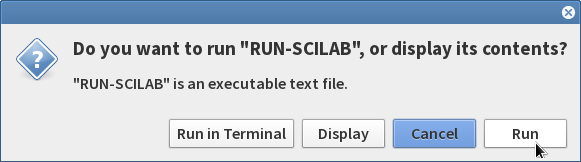
Double Click on “scilab” and give “Run” 


This will open and Run the SCILAB application in BOSS.

Once the SCILAB applciation is opened , click on Toolboxes → PSO 0.7 to load the PSO Toolbox.


How to interact with the non-interactable Web Elements in Selenium

How to interact with the non-interact able Web Elements in Selenium    // Find the non-interactable element element WebElement element = dr...