Thursday, July 17, 2014

Tally Support in LAN in windows xp installed in VirtualBox


1.Install virtual box


2.After installing virtualbox create virtual hard drive and install windows xp.


3.Copy the tally software in to windows xp virtual host.


4.In Virtual Box settings  select network ---> Attached To(Bridged Adapter) and update ip address of the windows xp virtual host.

5.Now Start the Tally


Friday, July 11, 2014

How to Install Borland C and C++ in BOSS Linux


1.Install the dosbox package from the repository


sudo apt-get install dosbox


2.Download the windows version Turbo C from the website or You should have a copy of Turbo C


3.The download copy in zip format Extract it to home directory or folder.

4.Open the dosbox application by using run command “dosbox”  or type dosbox in terminal.


5.Type following command in the doxbox prompt for installing turboc


mount c ~


c:


cd turboc
install.exe   ------type dos terminal it will install the Turbo C

6.Then go to TC\BIN directory for run the turbo C


cd TC\BIN\TC.EXE


7.Turboc installed Succesfully.


Screen Shots:


Monday, June 30, 2014

Javaodraw installation in BOSS 5.0

1.Go to the following link


2.Download the jaxodraw-2.1-0-bin.tar.gz file.

3.Extract the archive 

tar -xzf jaxodraw-xxx_bin.tar.gz

4.Run the jar file using java

java -jar jaxodraw-2.1-0.jar 

5.Now the Jaxodraw Window will open.

Monday, May 12, 2014

GRUB installation from BOSS Live CD/DVD

Boot the DVD and select the option live

open terminal

give the command as follows:
Note: mountedpartition is the partion, where OS is installed for eg: It might have mounted on /media/XXXXXXXXXXX/

Step I
----
#mount --bind /dev /mountedpartition/dev
#mount --bind /sys /mountedpartition/sys
#mount --bind /proc /mountedpartition/proc
----

Step II

#chroot /mountedpartition/
#grub-install /dev/sda
#exit

Finally restart your system.

Monday, April 21, 2014

Running SCILAB in BOSS


Copy the scilab.zip folder to Desktop in BOSS.

Right click the zip folder and give “Extract here” option.


Once the archive is extracted, go to the scilab folder. Go inside “bin” folder and locate “scilab” binary.


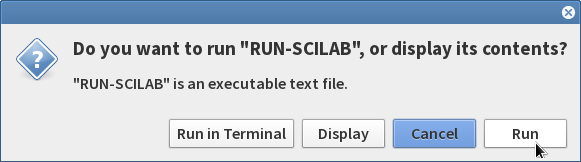
Double Click on “scilab” and give “Run” 


This will open and Run the SCILAB application in BOSS.

Once the SCILAB applciation is opened , click on Toolboxes → PSO 0.7 to load the PSO Toolbox.


Tuesday, February 18, 2014

Libreoffice Changes for tamil typing


Steps to change the libreoffice for tamil typing shown below through the screenshots.
Goto tools → options


Select the option in menu


select language settings --> languages 


To enable user interface install following package the select in the user interface option to tamil shown below in the screen shot.
sudo apt-get install libreoffice-l10n-ta


Thursday, January 30, 2014

How to Install BOSS linux dual OS With Windows 7


1.If Already dual OS image from existing hard disk should be clone to the new laptop hard disk.

Then issue will be solved.

2.Other format full hard disk using fdisk tool and create partions with logical volume not GPT enabled volume.

then install windows OS and BOSS Linux

How to interact with the non-interactable Web Elements in Selenium

How to interact with the non-interact able Web Elements in Selenium    // Find the non-interactable element element WebElement element = dr...