Monday, December 9, 2019


Thursday, September 12, 2019
Selenium TestNG - Running Multiple TestNG Classes using Java Main Class
List
file.add("/home/selenium-workspace/starauto/starEE.xml");
file.add("/home/selenium-workspace/starauto/starDD.xml");
TestNG testSTAR = new TestNG();
testSTAR.setTestSuites(file);
testSTAR.run();
Monday, September 9, 2019
Seleinum installation in BOSS Linux
Step:1
sudo apt-get install python-pip
Step:2
pip install -U selenium
for python3 and more install
Step:1 sudo apt-get install python-pip3
Step:2 python3.7 -m pip install -U selenium
Thursday, July 18, 2019
Create Bootable USB pendrive from an ISO
Step 1:
umount /media/boss/ISOIMAGE/
Step 2: mkfs.vfat -I /dev/sdb
Step 3:
dd if=/home/boss/Downloads/boss.iso of=/dev/sdb
Sunday, January 15, 2017
Canon Image Runner Printer Configuration Steps
1.Go to the following link http://support-in.canon-asia.com/?personal
2.In that page select the Product Category of your printer
Example now the printer is iR 2530 is coming under
Business Multifunction Category
Prdouct Series = < Image Runner Series >
Model = < iR2530 >
Document Type = < Drivers and Software Downloads >
Then click “Find” Options this will leads to the list of available drivers
3.Click the Downloads → Linux 32bit (1) options this will list driver for iR 2530 and Click that link
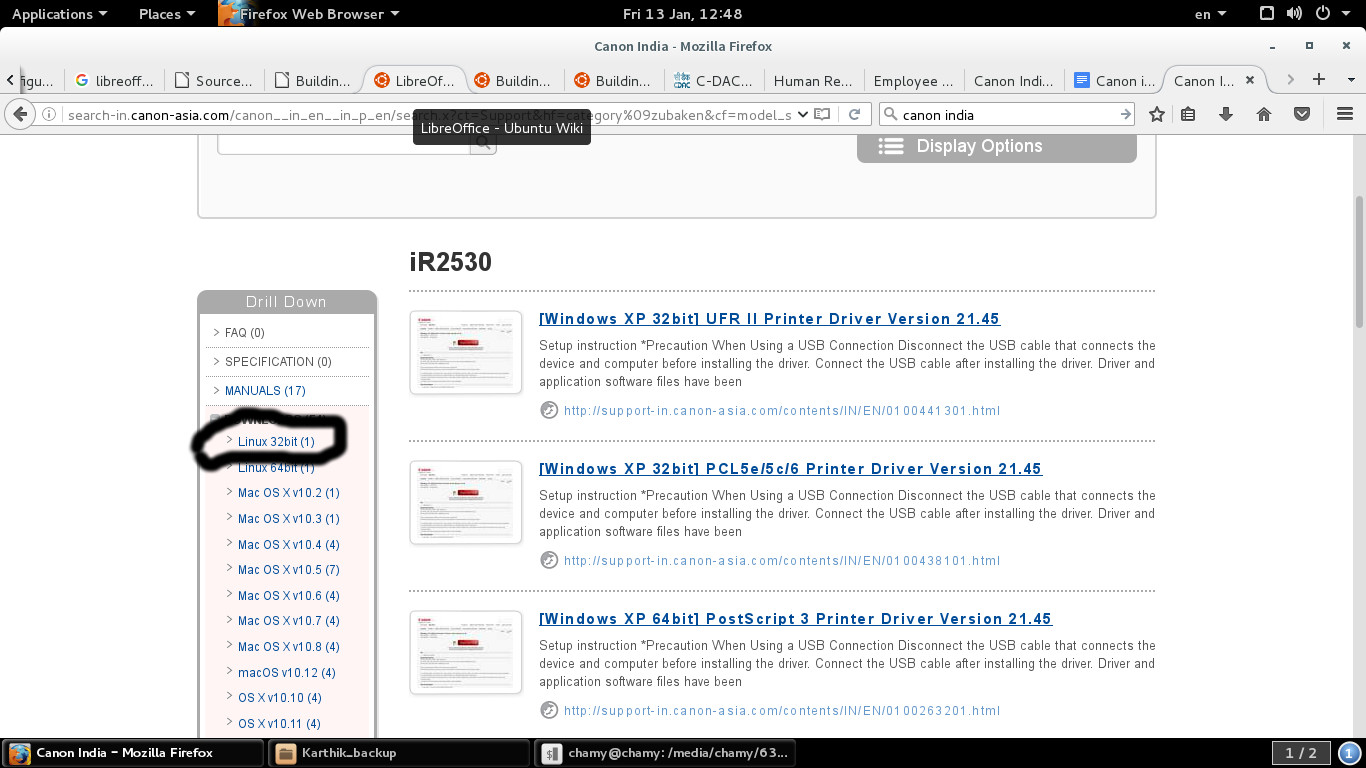
4.From the page you have to click the “Download ” Link and Save it in to the local folder file name is like this UFR II/UFR II LT Printer Driver for Linux V3.30.tar.gz
5.Extract the tar file
6.Open the Terminal and Change the directory to the Extracted driver folder
7.In that folder you find install.sh file then issue following commands
Before issuing commands system connected with Internet or Connected Local Repository because it is have dependency packages.
chmod u+x install.sh
sudo bash install.sh
8.Now the packages have been installed successfully and proceed with usual printer configuration method.
Tuesday, April 26, 2016
Install Debian Packages in BOSS GNU /Linux
1.first check the repository by issuing following command.
sudo apt-get update
2.if the repository is failed connect with repository server or change the differvent bosslinux distribution version repostory by editing following file
gedit /etc/apt/sources.list
3.after changing sources.list file repeat step 1.
4.to search the desired package in repository issue following command
apt-cache search "word to search the desired package"
example:
apt-cache search flashplugin
Output:
flashplugin-nonfree - Adobe Flash Player - browser plugin
flashplugin-nonfree-extrasound - Adobe Flash Player platform support library for Esound and OSS
pepperflashplugin-nonfree - Pepper Flash Player - browser plugin
5. To install the package named "flashplugin-nonfree" issue following command
sudo apt-get install flashplugin-nonfree
sudo apt-get update
2.if the repository is failed connect with repository server or change the differvent bosslinux distribution version repostory by editing following file
gedit /etc/apt/sources.list
3.after changing sources.list file repeat step 1.
4.to search the desired package in repository issue following command
apt-cache search "word to search the desired package"
example:
apt-cache search flashplugin
Output:
flashplugin-nonfree - Adobe Flash Player - browser plugin
flashplugin-nonfree-extrasound - Adobe Flash Player platform support library for Esound and OSS
pepperflashplugin-nonfree - Pepper Flash Player - browser plugin
5. To install the package named "flashplugin-nonfree" issue following command
sudo apt-get install flashplugin-nonfree
Thursday, December 17, 2015
To get the lines between the two pattern in a file in BOSS Linux
To get the lines between the two pattern in a file.txt use the following sed command format
sed -n "/pattern1/,/pattern2/p" file.txt
Subscribe to:
Posts (Atom)
-
 This process will common for all HP Printers like HP LJ P 1007, P1020,P1020 plus,1022,3050 MFP, M 5035 MFP,P 2015N and Configuring the HP ...
 -
Step:1 sudo apt-get install python-pip Step:2 pip install -U selenium for python3 and more install Step:1 sudo apt-get...
-
.Open the System -> Printing -> add 2.Then Select the Printer Connected to Parallel Port or Detected Printer name is TVS MSP 455XL...